
DATA DISTRICT DOCUMENTATION

How to Obtain Your DMA Card DNA ID
Connect to the service port, install the driver, and obtain the unique DNA ID required for personalized firmware.
7 min read Updated August 12, 2026 Verified by DATA DISTRICT DMA
DNA ID is the unique identifier of a specific DMA card. It is used to bind personalized firmware to that device. Read it on the secondary PC before writing the BIN file.
What you need
- 1A supported 35T, 75T, or 100T DMA card.
- 2A secondary PC running Windows 10 or 11 with a free USB 3.0 port.
- 3A known-good USB 3.0 data cable connected directly, without a passive hub.
- 4The fully extracted DATA DISTRICT DMA archive.
Connect the card
- 1If the card has a physical power switch, set it to ON.
- 2Shut the main PC down and install the card in a free PCIe slot.
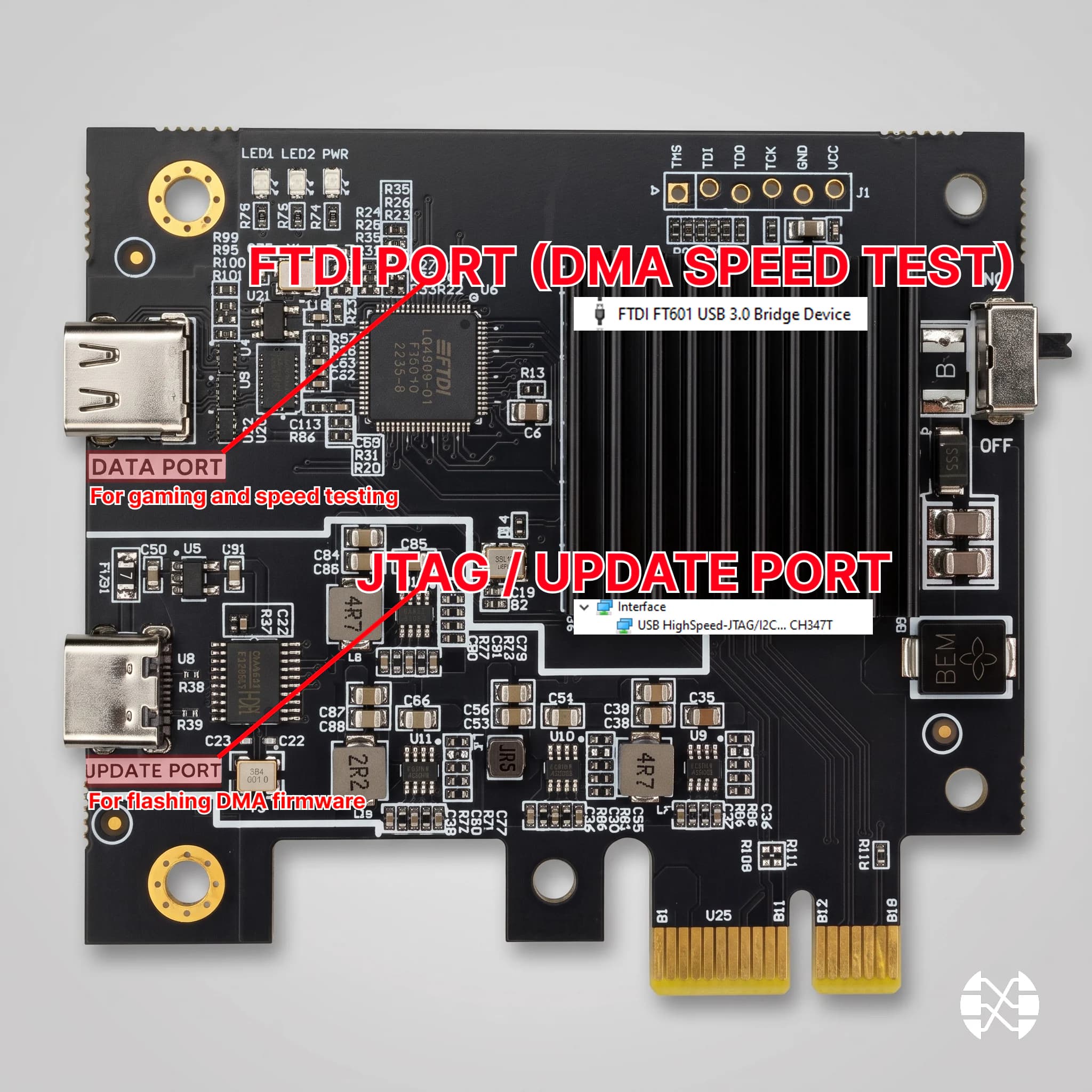
- 3Connect the Type-C cable to the service JTAG / CFG / Update port, not the DATA port.
- 4Connect the other end directly to a USB 3.0 / 3.1 / 3.2 port on the secondary PC, then boot both computers fully.
Read the DNA ID
- 1Run
JtagDrivers.exefrom the archive as administrator and complete the installation. - 2Open
DATA DISTRICT DMA\DNA_ID. - 3Run the script that exactly matches the card FPGA: CH347-35T.bat, CH347-75T.bat, or CH347-100T.bat. Use 35T.bat, 75T.bat, or 100T.bat only as the corresponding fallback.
- 4Copy both output lines in full: the binary and hexadecimal DNA values.
- 5Send the DNA ID, card model, and order number to @SpiralDD.
Troubleshooting
- 1If the driver fails, fully extract the archive, reconnect the JTAG cable, and rerun the installer as administrator.
- 2If the card is not detected, try another USB 3.0 port, PCIe slot, and known-good USB 3.0 data cable.
- 3If the primary script fails, use the fallback script for the same FPGA family only.
- 4If the script closes immediately, verify that the archive was fully extracted and all files remain together.
NEED HELP?
Could not complete the guide?
Tell us your DMA card model, motherboard, Windows version, and attach a screenshot of the error.